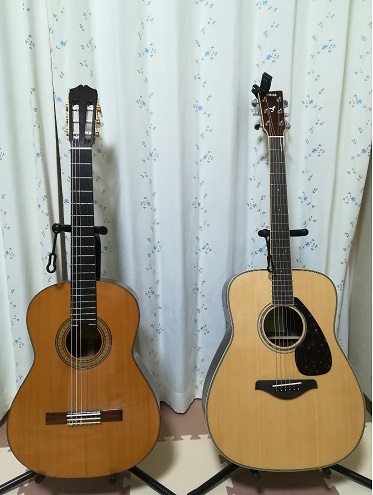
パーカッシブギター練習のために購入。
FG830はSR-10より一回り大きい。重い。
音色も十分。サスティンが長い。
> mkdir redmine
> cd redmine
> vagrant init chef/centos-6.5
> vim Vagrantfile
# enable gui
# vb.cutomize ["modifyvm", :id, "--memory", "2048"]
# IP address: 10.0.0.100
> vagrant upuser name: vagrant
password : vagrant$ wget --no-check-certificate https://bitnami.com/redirect/to/40137/bitnami-redmine-2.5.2-2-linux-x64-installer.run
$ chmod 755 bitnami-redmine-2.5.2-2-linux-x64-installer.run
$ ./bitnami-redmine-2.5.2-2-linux-x64-installer.runYour real name [User Name]:
Email Address[]:
Login [user]:
Password :$ sudo cp -piv ./ctlscript.sh /etc/rc.d/init.d/bitnami-redmine
$ cd /etc/rc.d/init.d/
$ vi bitnami-redmine
#!/bin/sh# chkconfig: 2345 80 30 ←追記
# description: BitNami Service ←追記# Allow only root execution
$ sudo chkconfig --add bitnami-redmine
$ sudo chkconfig --list bitnami-redmine$ sudo service bitnami-redmine restart
It can take some work to show that something is not an affine variety.
For example, consider the set
[tex: X = \{(x,x) : x \in \mathbb{R}, x \neq 1} \
アンケートをExcelブックで取るとか、
そういう処理において、「氏名を記入してください!!!!」
と言っても聞いてない人がいる。
そんなのは最初から設定してしまえばいい。
| ディレクトリ名 | ブック名 | シート名 | セル名 | 値 |
の形式のシートを作成して、以下のマクロを実行すると、
該当するセル名のセルに、値を設定してくれる。
Option Explicit

Sub データ設定()
    Dim bkInput As Workbook
    Set bkInput = ThisWorkbook
    Dim shtInput As Worksheet
    Set shtInput = bkInput.Sheets(1)
    Dim bkOutput As Workbook
    Set bkOutput = Workbooks.Add
    shtInput.Copy Before:=bkOutput.Sheets(1)
    Dim shtOutput As Worksheet
    Set shtOutput = bkOutput.Sheets(1)

    Dim sPath As String
    Dim sBook As String
    Dim sSheet As String

    Application.DisplayAlerts = False

    Dim nRow As Integer
    nRow = 2
    Do While shtOutput.Cells(nRow, 1) <> ""
        sPath = shtOutput.Cells(nRow, 1)
        sBook = shtOutput.Cells(nRow, 2)
        sSheet = shtOutput.Cells(nRow, 3)

        Dim bkData As Workbook
        Dim shtData As Worksheet

        Set bkData = Workbooks.Open(Filename:=sPath & "\" & sBook, ReadOnly:=False)
        Set shtData = bkData.Worksheets(sSheet)

        shtData.Range(shtOutput.Cells(nRow, 4)).Value = shtOutput.Cells(nRow, 5)

        bkData.Save
        bkData.Close

        nRow = nRow + 1
    Loop

    Application.DisplayAlerts = True

End Sub
プログラミング教育をしていると、ソースコードをWord文書や
PowerPointスライドに貼り付ける作業をすることがある。
そんなときのWordVBAマクロ。
1. Wordの新規文書に、ソースコードを貼り付ける。
2. マクロを実行する。
3. 表形式にフォーマットされたソースコードができる。
Eclipse->Word->PowerPoint
と変換することで、Eclipseの見た目通りに、PowerPointスライドを
作れる。
Sub FormatCode()

    ActiveDocument.Select

    Dim codelines As Paragraphs
    Set codelines = Selection.Paragraphs

    Selection.Copy

    Dim lines As Long
    lines = codelines.Count

    Dim lineNumber As Integer
    lineNumber = 1

    Dim myTable As Table
    Set myTable = ActiveDocument.Tables.Add(ActiveDocument.Range(0, 0), lines, 2, wdWord9TableBehavior)

    myTable.Columns(1).Width = 30
    myTable.Columns(1).Select
    Selection.ParagraphFormat.Alignment = wdAlignParagraphRight
    Selection.Font.Color = wdColorAutomatic
    myTable.Columns(2).Width = 400

    Call SetTablelines(myTable)

    For lineNumber = 1 To lines
        myTable.Cell(lineNumber, 1).Range.Text = lineNumber
    Next lineNumber

    myTable.Columns(2).Select
    Selection.Paste

    For Each s In ActiveDocument.Sentences
        s.Select
        If Selection.Information(wdWithInTable) = False Then
            Selection.Delete
        End If
    Next s

End Sub

Private Sub SetTablelines(ByRef myTable As Table)
    With myTable
        With .Borders(wdBorderLeft)
            .LineStyle = wdLineStyleSingle
            .LineWidth = wdLineWidth050pt
            .Color = wdColorAutomatic
        End With
        With .Borders(wdBorderRight)
            .LineStyle = wdLineStyleSingle
            .LineWidth = wdLineWidth050pt
            .Color = wdColorAutomatic
        End With
        With .Borders(wdBorderTop)
            .LineStyle = wdLineStyleSingle
            .LineWidth = wdLineWidth050pt
            .Color = wdColorAutomatic
        End With
        With .Borders(wdBorderBottom)
            .LineStyle = wdLineStyleSingle
            .LineWidth = wdLineWidth050pt
            .Color = wdColorAutomatic
        End With
        .Borders(wdBorderHorizontal).LineStyle = wdLineStyleNone
        With .Borders(wdBorderVertical)
            .LineStyle = wdLineStyleSingle
            .LineWidth = wdLineWidth050pt
            .Color = wdColorAutomatic
        End With
        .Borders(wdBorderDiagonalDown).LineStyle = wdLineStyleNone
        .Borders(wdBorderDiagonalUp).LineStyle = wdLineStyleNone
        .Borders.Shadow = False
    End With
    With Options
        .DefaultBorderLineStyle = wdLineStyleSingle
        .DefaultBorderLineWidth = wdLineWidth050pt
        .DefaultBorderColor = wdColorAutomatic
    End With
End Sub